Azure Virtual Desktop · cost control
Manage AVD and take back your Azure bill.
Frugal is secret-less Azure Virtual Desktop management and FinOps that installs into your own Azure tenant. Host pools, auto-scale, a cost treemap, per-department chargeback and Essential Eight hardening — least-privilege, no keys.
$ curl -sL https://frugal.run/install.sh | bash -s -- --region <azure-region>
New · Cost treemap
See where every Azure dollar goes — at a glance.
The new cost treemap sizes every box by spend and colours it by the change against the prior period — so a runaway service or resource group jumps out instantly. Group by service, resource group, location or subscription.
- Box = spend, colour = change
- Red up · green down · new · flat
- Group by service, RG, location, subscription
- Backed by live Azure Cost Management data
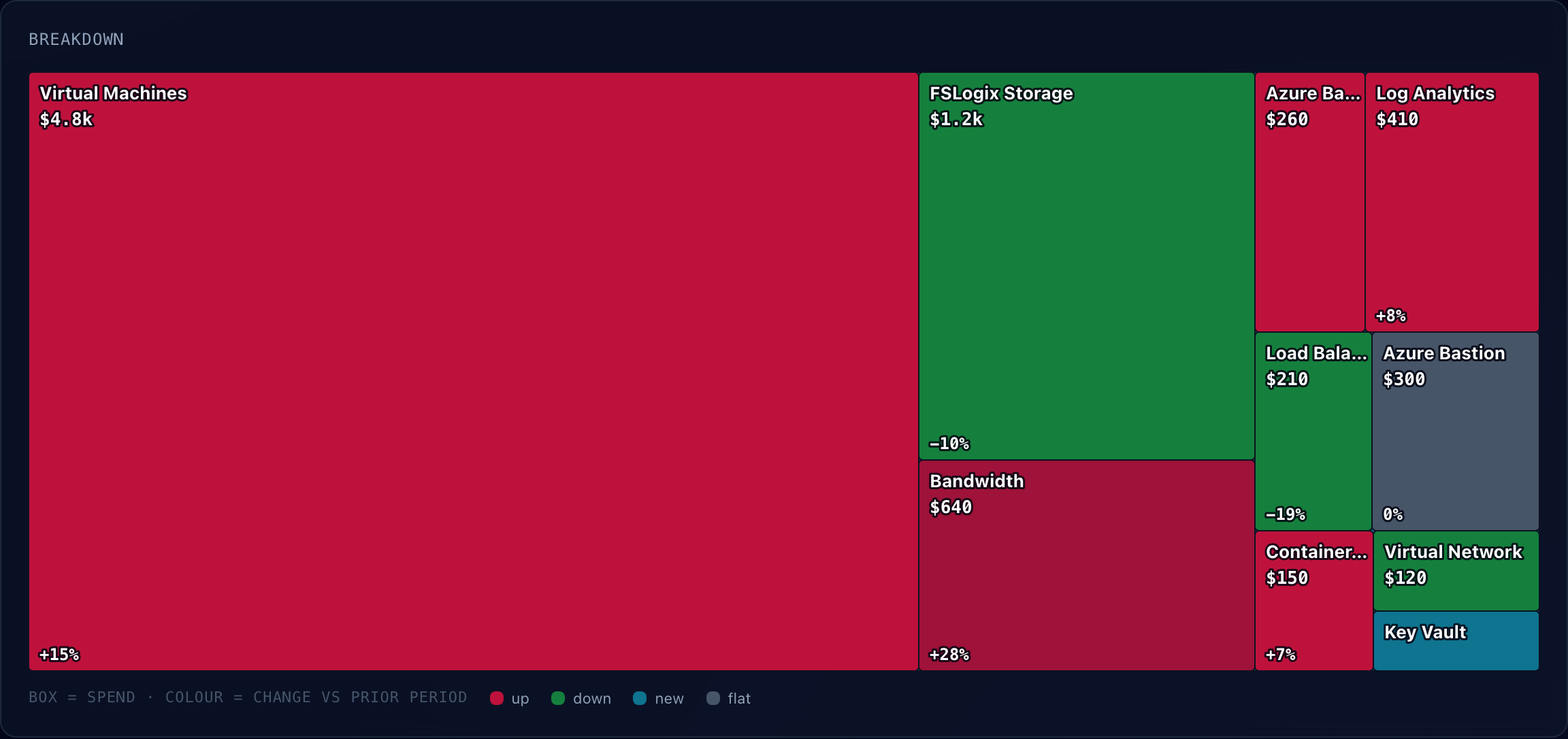
Cost by service. Box size is spend; colour is the change vs the prior equal-length period (red = up, green = down, cyan = new).
Capabilities
Everything you run AVD with, in one console.
Host pools
Create, operate, and tear down AVD host pools and their session hosts — pooled or personal — from one place.
Auto-scale
Ramp capacity to real demand and power idle hosts down. Stop paying for empty desktops overnight and on weekends.
Cost Explorer new
Live Azure cost sync with tag attribution and a spend treemap — box size is cost, colour is the change vs the prior period. Group by service, resource group, location or subscription.
Chargeback new
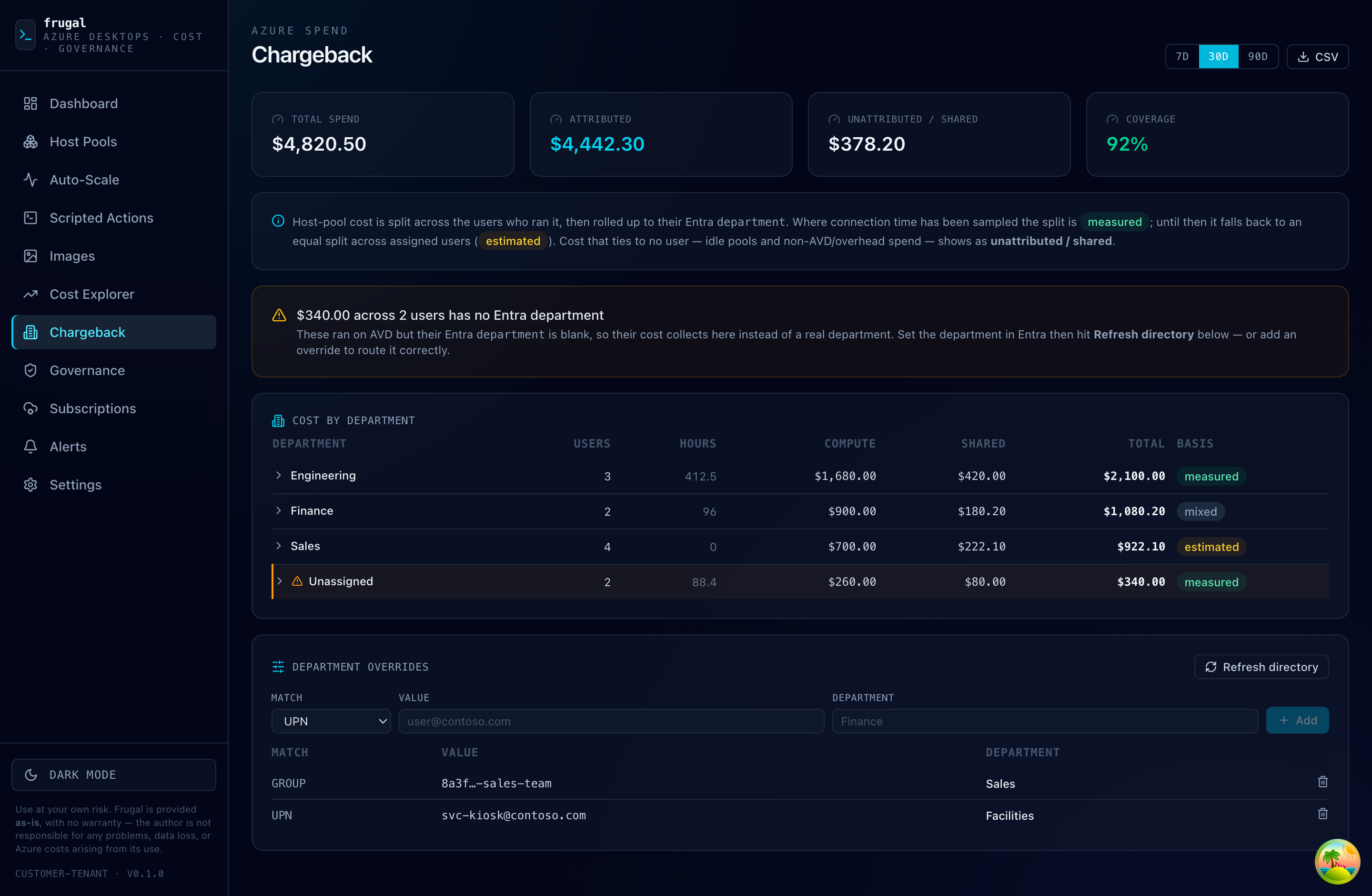
Attribute AVD spend to the users who ran it and roll it up to their Entra department — per-team showback, straight from live session time.
Golden images
Build, harden, and capture custom images, then roll them to pools straight from your shared gallery.
Essential Eight
One-click ACSC Maturity Level 1 & 2 hardening bundles, with a live compliance posture dashboard.
Governance
Untagged and newly-created resources surfaced first — so sprawl and cost never sneak up on you.
Scripted actions
Run built-in or your own scripts across session hosts: patching, configuration, hardening, cleanup.
Scale
Tens of subscriptions, synced in parallel. Discovery is opt-in — nothing gets managed by surprise.
New · Chargeback
Whose desktops does your bill pay for?
Frugal splits every host-pool dollar across the users who really ran it, then rolls it up to their Entra department — turning a lump-sum AVD invoice into per-team chargeback. No agents, no tags to maintain: it reads live session time and the directory you already have.
- Per-user & per-department split
- Measured from real connection time
- Unattributed shown honestly
- One-click CSV export
How it runs
In your Azure. On your terms.
Secret-less
Runs on a managed identity inside your tenant. No secrets, no keys, nothing to leak.
Least-privilege
Constrained RBAC + ABAC, scoped to a single resource group. Never Owner. Never User Access Administrator.
Your cloud
Installs into your own Azure subscription. Your data and your desktops never leave it.
Seamless upgrades
Image-only rolls that preserve your database. Upgrade in place without losing state.
Security audits welcome. Frugal gets an identity that can act in your Azure — so don’t take our word for it, audit it. The install templates and the exact permissions it requests are public; the full source is available for review on request. Responsible disclosure and access requests — avd@frugal.run.
Pricing
One price. Everything included.
No feature gates. No license keys. No per-seat maths. One subscription covers every capability, unlimited users, and as many Azure subscriptions as you manage.
Already subscribed? Manage or cancel your subscription ↗
Use at your own risk. Frugal is provided as-is, with no warranty of any kind — the author is not responsible for any problems, data loss, or Azure costs arising from its use. See the full Terms of Service.