FinOps for Azure Virtual Desktop
FinOps for Azure Virtual Desktop (AVD)
Azure Virtual Desktop bills you a lump sum for host pools, session hosts and FSLogix storage — and leaves you to work out where it went. Frugal is the FinOps layer for AVD: it makes that spend visible, attributes it to the teams and users who drive it, and continuously trims the waste — all least-privilege, inside your own Azure tenant.
The three loops
What FinOps for AVD actually means
FinOps brings engineering, finance and operations onto the same page about cloud cost. For Azure Virtual Desktop that comes down to three loops: see the cost clearly, attribute it to who caused it, and optimize it continuously. Frugal runs all three for AVD specifically — the parts raw Azure Cost Management can’t express on its own.
Cost visibility
Live Azure cost sync, broken down per subscription, per host pool and per tag — plus a treemap so AVD spend is never a black box.
Chargeback & showback
Split each pool’s cost across the users who ran it and roll it up to their Entra department. Per-team chargeback, from measured session time.
Auto-scale savings
Drain and deallocate idle session hosts overnight and on weekends. Stop paying for empty desktops — the single biggest AVD saving.
Rightsizing
Per-pool utilization against real peak sessions, with host-count recommendations so pools aren’t over-provisioned.
Budgets & anomalies
Set monthly budgets, get warned before you blow them, and catch spend anomalies the day they happen.
Governance
Untagged and newly-created resources surfaced first, so cost is always attributable to an owner or cost centre.
Chargeback
Whose desktops your AVD bill pays for
The hardest FinOps question for AVD is who the cost belongs to — pooled desktops are shared, so a raw invoice can’t tell you. Frugal answers it: it samples live connection time, splits each host pool’s compute and storage across the users who actually used it, and rolls those users up to the Microsoft Entra department they belong to. Cost that ties to no user shows as an explicit unattributed bucket, so the numbers always reconcile — and everything exports to CSV.
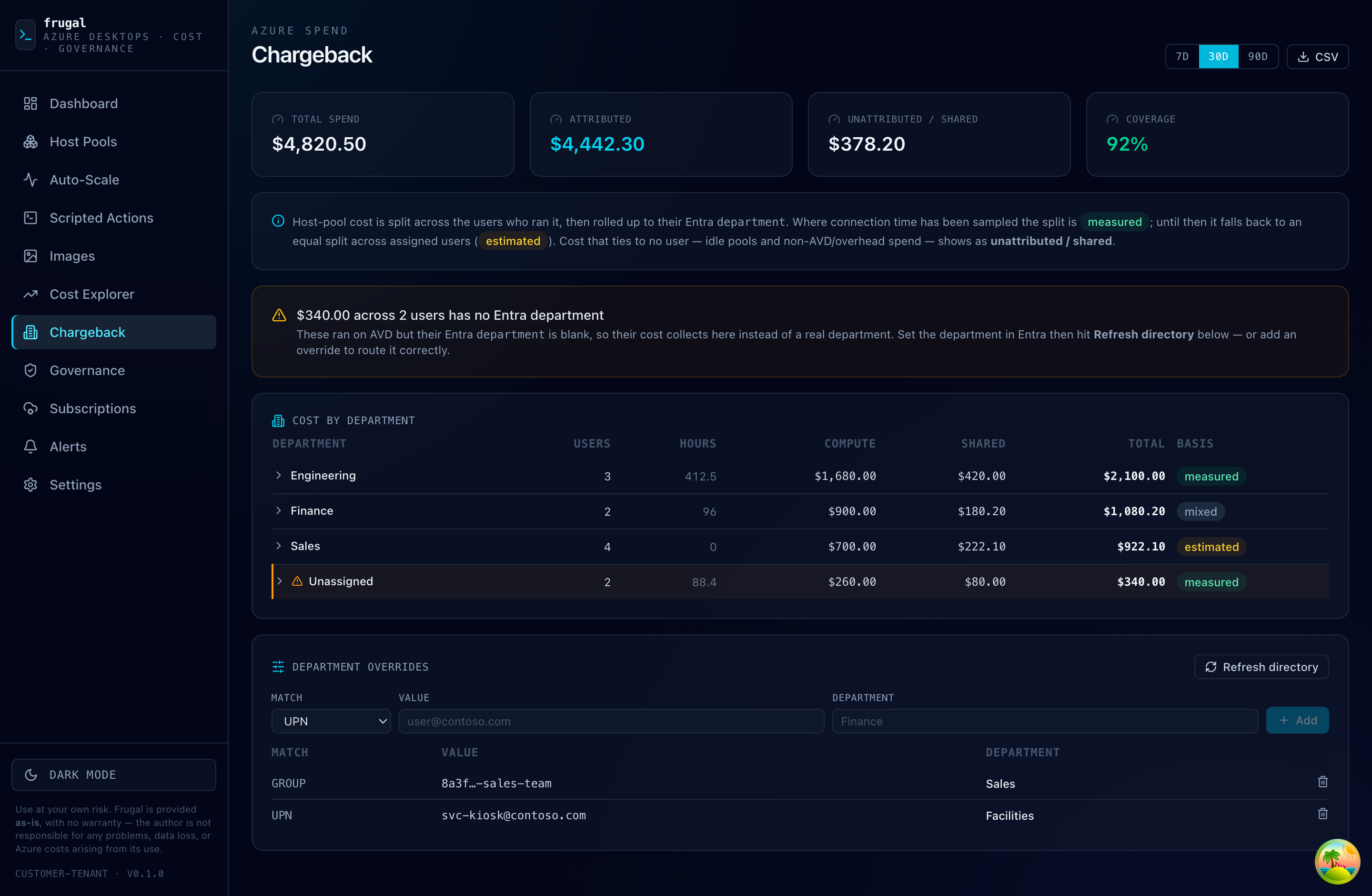
AVD cost attributed by Entra department, with live coverage and an honest unattributed / shared bucket.
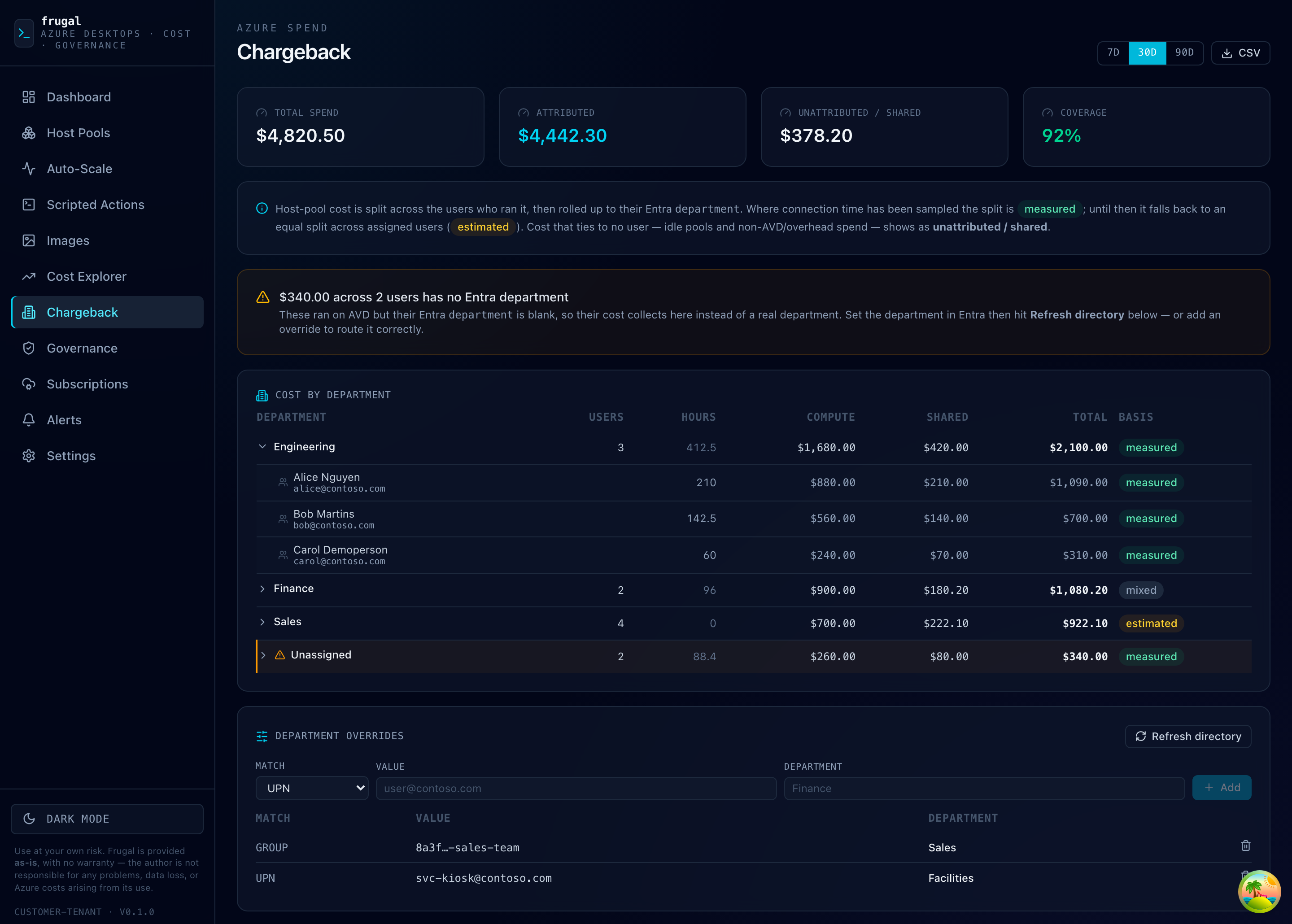
Expand any department down to the exact users, hours and dollars behind the spend.
Where it runs
In your tenant, least-privilege
Frugal installs into your own Azure subscription and runs on a user-assigned managed identity — no secrets, no keys. It’s scoped least-privilege (constrained RBAC and ABAC, never Owner or User Access Administrator), so your AVD cost data and your desktops never leave your tenant. One Cloud Shell command installs it.
$ curl -sL https://frugal.run/install.sh | bash -s -- --region <azure-region>
FAQ
FinOps for AVD — FAQ
What is FinOps for Azure Virtual Desktop (AVD)?
FinOps for AVD is bringing financial accountability to Azure Virtual Desktop spend: making the cost of host pools, session hosts and FSLogix storage visible, attributing it to the teams and users who drive it, and continuously cutting waste through auto-scaling, rightsizing and budgets — inside your own Azure tenant.
How do I reduce Azure Virtual Desktop (AVD) costs?
The biggest savings come from auto-scaling — draining and deallocating idle session hosts overnight and on weekends instead of paying for empty desktops — plus rightsizing pools to real peak usage, catching spend anomalies early with budgets and alerts, and a savings plan for steady-state compute. Frugal automates all of these.
How do I do chargeback or showback for AVD?
Frugal splits each host pool’s cost across the users who actually ran it — weighted by measured connection time — and rolls it up to their Entra department, so you can charge or show AVD cost back per team. Cost that ties to no user is reported as an explicit unattributed bucket, and results export to CSV.
Does Frugal replace Azure Cost Management for AVD?
No — it complements it. Frugal reads Azure Cost Management data and adds the AVD-specific FinOps layer on top: per-pool and per-user attribution, auto-scale savings, rightsizing, and department chargeback that raw cost data can’t express on its own.
Where does Frugal run, and is it secure?
Frugal installs into your own Azure subscription and runs on a user-assigned managed identity — no secrets or keys — scoped least-privilege (constrained RBAC and ABAC, never Owner or User Access Administrator). Your cost data and desktops never leave your tenant.